

Understanding Your Analytics
Campaign performance, gift revenue, AOV comparisons — and how the numbers are measured.
I. Per-campaign metrics
1. Campaign list
The Campaign list is organized into tabs by campaign family (Free Gift, Upsell, and Bundles). For each campaign, you can view its Status, Widget status (e.g., Shown on storefront, including when it was last seen), campaign type, and start date.
2. Action icons
Use the Action icons to start or pause a campaign, edit it, duplicate it, or delete it.
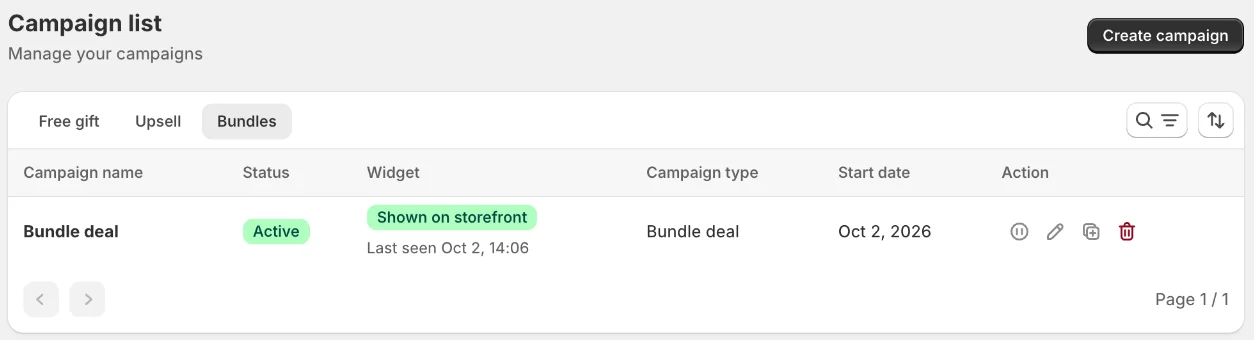
3. Dashboard Analytics
The Dashboard Analytics card gives you an overview of your campaign performance through three key metrics: Offer Revenue, Accepted Orders, and Offer's AOV.
II. Store-level metrics
The Analytics page has four tabs — Overview, Free Gift, Upsell and Bundle — a date range picker (e.g. Last 30 days) and a vs previous period comparison.
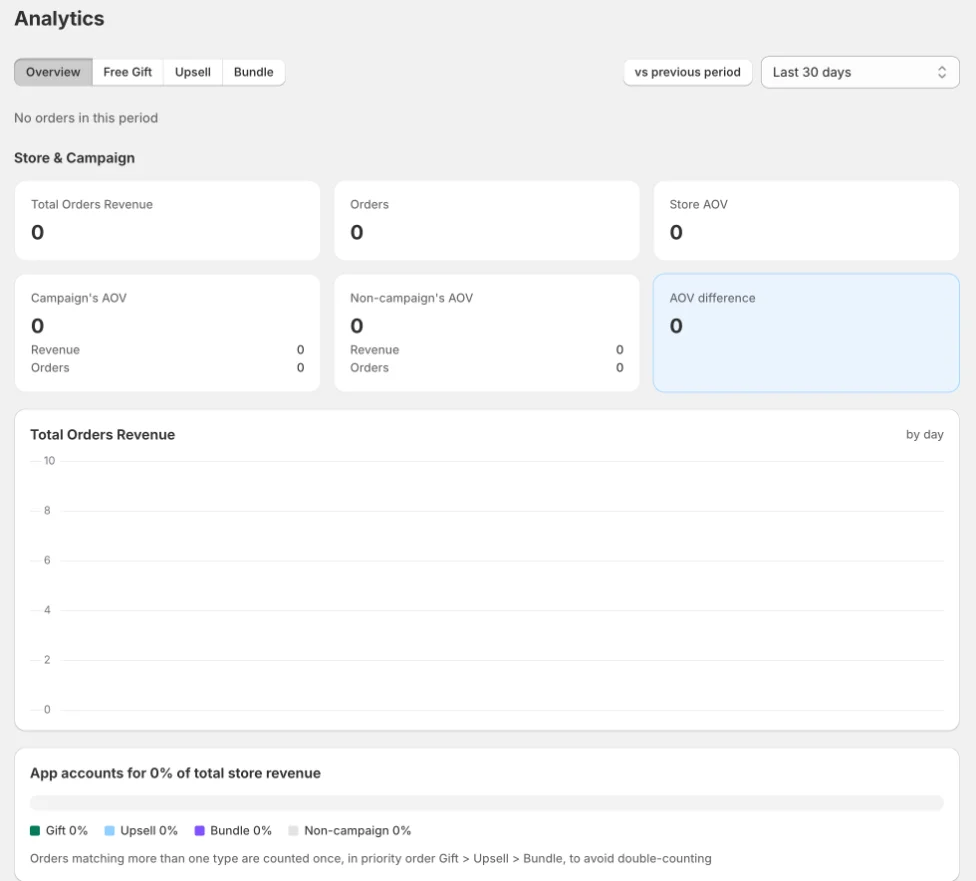
1. Overview / Store & Campaign
Includes key metrics such as Total Order Revenue, Total Orders, Store AOV, Campaign AOV, Non-campaign AOV, and the AOV difference, along with a revenue chart showing how much of your store’s total revenue is generated by the app.
2. Free Gifts
Includes Orders with Gift, Gift Revenue, Gift AOV, Non-gift AOV.
3. Upsell
Includes Orders with Upsell, Upsell Revenue, Upsell AOV, Non-upsell AOV.
4. Bundle
Includes Orders with Bundle, Bundle Revenue, Campaign AOV and the bundle funnel (View → Add to cart → Order).
5. Campaign vs. Non-Campaign AOV
The key metric to watch is Campaign AOV vs. Non-campaign AOV. For example, if orders that include a campaign offer have an average order value of $85, compared with $60 for orders without a campaign offer, your campaigns may be encouraging customers to spend more rather than simply giving away discounts.
How orders are counted: If an order matches multiple campaign types, it is counted only once, using this priority order: Gift > Upsell > Bundle. This prevents double-counting.
III. How the numbers are measured
Metrics are based on paid orders: an order counts as a campaign order when it contains items added by a gift or upsell campaign. Numbers appear in near real time after payment.
Important notes: Revenue is calculated using gross amounts at the time of payment. Refunds and cancellations are not deducted, and currency conversions in multi-currency stores may be approximate. For financial reporting, use Shopify’s reports as the source of truth. Use these analytics to compare campaign performance.
Still need help?
Our support team is available 24/7. Contact support →