

Survey Channels Overview
The six places a survey can appear, and how to choose the right one
Overview
A channel is where customers see your survey. One survey can run on several channels at the same time, and all responses are collected in the same place.
You turn channels on and set them up in the Channels tab of the survey builder.
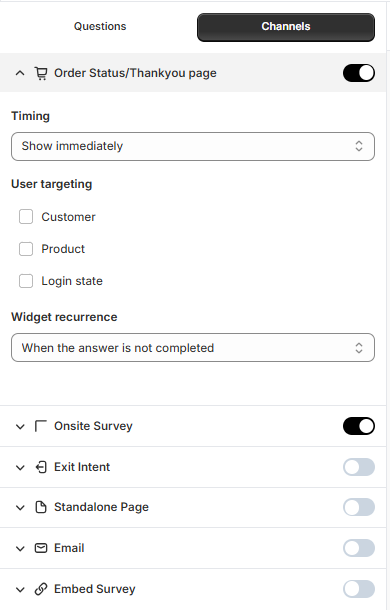
Available channels
Channel | Where customers see it |
|---|---|
Order Status/Thankyou page | On the Thank you page, right after checkout. |
Onsite Survey | A widget on the store pages you choose, such as the home page or product pages. |
Exit Intent | A widget shown when a visitor is about to leave your store. |
Standalone Page | A survey page with its own link that you can share. |
An email sent to customers after they place an order. | |
Embed Survey | Inside a section of your store's theme. |
Set up a channel
Open your survey and click the Channels tab.
Turn on the toggle next to the channel you want to use.
Click the arrow next to the channel to see its settings, such as which pages the survey appears on, when it appears, and who sees it.
Use the settings panel on the right to adjust the look of the survey and any extra setup for that channel.
Click Save.
Before you start:
Onsite Survey and Exit Intent need the app embed to be turned on. See Installing & Activating Ego Contact Form Survey.
Order Status/Thankyou page needs the Ego Contact Form Survey block added to your Thank you page. See Thank You & Order Status Page Surveys
Which channel should I use?
Learn how customers found you → Order Status/Thankyou page. Customers have just bought and are happy to answer a quick question.
Get feedback while customers browse → Onsite Survey.
Find out why visitors leave → Exit Intent.
Ask for feedback after delivery → Email.
Share a survey on social media or in a newsletter → Standalone Page.
Tip: Start with one channel per survey. If you turn on several channels, check their settings so the same customer isn't asked twice.
Still need help?
Our support team is available 24/7. Contact support →