

On-site Widget & Exit-Intent Surveys
Show a survey on your store pages, or when visitors are about to leave
Overview
Onsite Survey shows the survey as a widget on the store pages you choose, such as the home page or product pages
Exit Intent shows the survey when a visitor is about to leave your store - a good moment to ask why they didn't buy
Both channels need the app embed to be turned on. See Installing & Activating Ego Contact Form Survey.
Step 1 - Turn on the channel
Open your survey and click the Channels tab
Turn on Onsite Survey or Exit Intent
Click the arrow next to the channel to open its settings
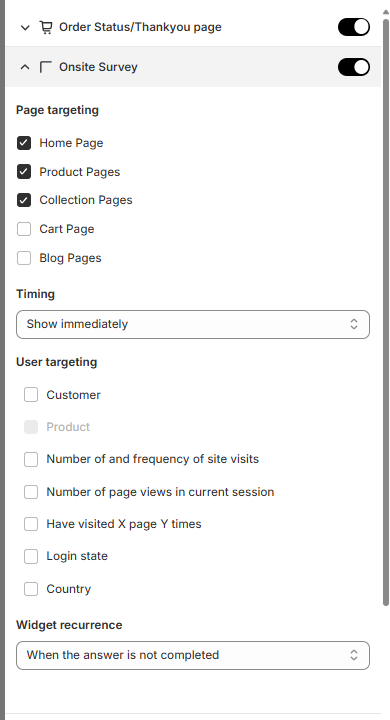
Step 2 - Choose where and when the survey appears
Setting | What it does |
|---|---|
Page targeting | The pages where the survey appears: Home Page, Product Pages, Collection Pages, Cart Page and Blog Pages. |
Timing | When the survey appears: Show immediately or X seconds after load. |
User targeting | Show the survey only to certain visitors — for example by customer type, login state, country or how often they visit. See Targeting Rules |
Widget recurrence | How often the same visitor sees the survey. See the options below. |
Widget recurrence options:
When the answer is not completed - keep showing the survey until the visitor finishes it
Show only one - show the survey once per visitor
Always show - show the survey on every visit to a selected page
Stop after X attempts - wait a set time, for example 1 day, before showing it again
Delay before reappearing - wait a set time, for example 1 day, before showing it again
Step 3 - Customize the widget
In the settings panel on the right, choose the widget Position (bottom left, center, or bottom right), a Color theme, and the style of the widget, answers and buttons. See Customizing Survey Appearance
Step 4 - Save
Click Save. Visit one of the selected pages in your store to see the survey
Testing tip: If you have already answered or closed the survey, it may not show again because of Widget recurrence. Use an incognito window to test as a new visitot
Exit Intent settings
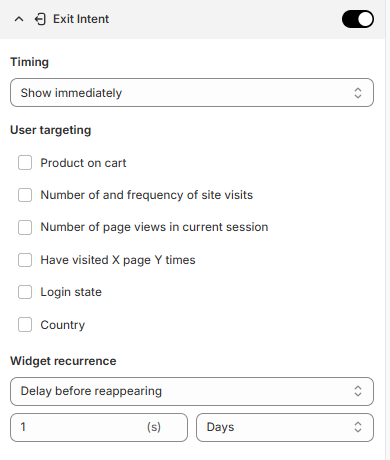
Exit Intent has the same settings as Onsite Survey, with two differences:
There is no Page targeting - the survey can appear on any page when the visitor is about to leave
User targeting has Product on cart instead of Customer, so you can show the survey only to visitors who have products in their cart. This is useful for asking why they didn't check out
Still need help?
Our support team is available 24/7. Contact support →