

Question Types & Settings
Add questions to your survey, choose the right type, and set up each question.
Add a question
In the survey builder, open the Question tab
Click Add content below the question list
Hover over a question type to see an example in the center of the screen, then click it to add it to your survey
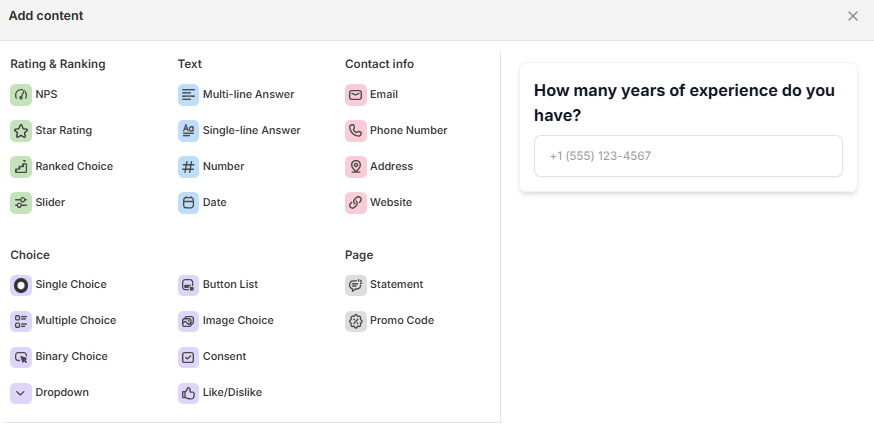
After adding a question, click it in the list to edit its text, answers and settings. To change the type of an existing question, use the dropdown at the top of its settings panel
Choose the question type
Group | Types | Use them to… |
|---|---|---|
Choice | Single Choice, Multiple Choice, Binary Choice, Dropdown, Button List, Image Choice, Consent, Like/Dislike | Let customers pick from answers you set — for example "How did you hear about us?" |
Rating & Ranking | NPS, Star Rating, Ranked Choice, Slider | Measure satisfaction, loyalty or preferences on a scale. |
Text | Single-line Answer, Multi-line Answer, Number, Date | Collect open answers, numbers or dates. |
Contact info | Email, Phone Number, Address, Website | Collect contact details, for example to follow up or send a discount code. |
Page | Statement, Promo Code | Show text without a question, or show a discount code. See Reward Customers with Discount Codes. |
End screen - the screen customers see after the last question. Click Add content under End screen to choose Thank You (a thank-you message) or Redirect To URL (send customers to another page).
The Welcome Screen is not in the Add content menu. Turn it on or off with its toggle at the top of the Questions tab.
Tip: Choice and rating questions are quicker to answer and show as charts in Analytics. Start with them and end with one optional text question.
Set up the queston
Click a question in the Questions tab. Its settings open in the panel on the right.
[Image: Settings panel of a question (ảnh 20)]
Every question has a Heading, an optional Description and an optional Image. Other fields depend on the type:
Question type | Extra fields |
|---|---|
Single Choice, Multiple Choice, Dropdown, Button List, Ranked Choice | Answer(s) — add, edit, reorder or remove answers. |
Image Choice | Answer(s), with Upload Image for each answer. |
Like/Dislike | Answer(s) — the items customers rate with a thumbs up or thumbs down. |
Binary Choice | Two answers (Yes / No). You can change their text only. |
Consent | One answer — the text customers tick to agree. |
Star Rating | Values range (number of stars), Icon, ratingText (text shown after rating). |
NPS | Values range, Left / Center / Right label. |
Slider | Left / Right (lowest and highest value), Increments, Start position, Left / Center / Right label. |
Single-line Answer, Multi-line Answer | Placeholder, Max characters. |
Number, Email, Website | Placeholder. |
Phone Number | Phone code — let customers choose their country code. |
Address | No extra fields. Customers fill in street, city, state, ZIP code and country. |
Date | Date format, minimum and maximum date, Format display. |
Statement | Button text. |
Promo Code | Discount code, Button, Send email. |
Use the advance settings
Under Advance settings, turn on the options you need. The options depend on the question type.
Setting | What it does | Available for |
|---|---|---|
Required | Customers must answer to continue. | All types except Statement and Promo Code |
Randomize | Shuffles the answer order for each customer. | Single Choice, Multiple Choice, Dropdown, Button List, Image Choice, Ranked Choice, Like/Dislike |
Alphabetical order | Sorts answers from A to Z. | Dropdown |
"Other" option | Adds an Other answer customers can type in. | Single Choice, Multiple Choice, Dropdown, Button List |
Show label | Shows the answer text below each image. | Image Choice |
Multiple selection | Lets customers pick more than one answer. | Button List, Image Choice |
Change layout | Changes how answers are arranged, for example two images per row instead of three. | Single Choice, Multiple Choice, Button List, Image Choice |
Tips:
Turn on Required only for questions you really need - it can lower completion rates.
Use Randomize for questions like "How did you hear about us?" so customers don't just pick the first answer.
Check the preview on desktop and mobile after each change.
Still need help?
Our support team is available 24/7. Contact support →