

Targeting Rules
Show your survey only to the customers you want to hear from
Overview
By default, a survey is shown to everyone who reaches the channel. With User targeting, you can limit it to certain customers - for example, only new customers, or only visitors from a certain country
Targeting is set per channel, so the same survey can target different customers on each channel
Set up targeting
Open your survey and click the Channels tab
Click the arrow next to a channel to open its settings
Under User targeting, tick the conditions you want to use and fill in their details
Click Save
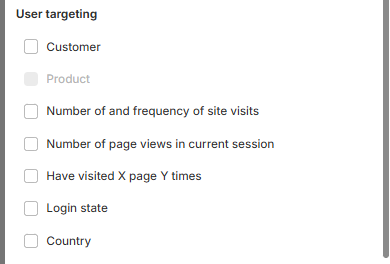
Available conditions
The conditions you can use depend on the channel
Condition | Shows the survey to… | Channels |
|---|---|---|
Customer | Customers by type or history: All customer, New customer, Return customer, Customer tags, Order count or Customer total spent. | Onsite Survey, Order Status/Thankyou page, Email |
Product | Customers who bought certain products. Choose Product Id or Variant Id, then click Select to pick the products. | Order Status/Thankyou page |
Product on cart | Visitors who have products in their cart. | Exit Intent |
Number of and frequency of site visits | Visitors who have visited your store a certain number of times. | Onsite Survey, Exit Intent |
Number of page views in current session | Visitors who have viewed a certain number of pages in this visit. | Onsite Survey, Exit Intent |
Have visited X page Y times | Visitors who have visited a certain page a number of times. | Onsite Survey, Exit Intent |
Login state | Visitors who are logged in, or not logged in. | Onsite Survey, Exit Intent, Order Status/Thankyou page |
Country | Visitors from the country you choose. | Onsite Survey, Exit Intent |
Still need help?
Our support team is available 24/7. Contact support →