

Reward Customers with Discount Codes
Set up the Promo Code question — on-screen or email-gated — step by step.
Overview
You can reward customers with a discount code at the end of your survey. The code is shown with the Promo Code content type, so customers can copy it and use it at checkout.
To offer a reward, you need to:
Create the discount in Shopify
Add a Promo Code to your survey
Save the survey
Step 1 - Create the discount in Shopify
From your Shopify admin, go to the Discounts and click Create discount
Choose a discount type, for example Amount off order for 10% off the whole order
Enter the discount code, for example THANKS10, and set the discount value
Click Save
The survey only shows the code. Setting such as usage limits, minimum purchase and end date are controlled in Shopify
Step 2 - Add a Promo Code to your survey
Open your survey in the builder
in the Questions tab, click Add content below the question list
In the Page group, click Promo Code, It is added at the end of your questions, so customers see it after they answer
Use the Add content button below the question list. The one under End screen only offers Thank You and Redirect URL
Step 3 - Set up the Promo Code
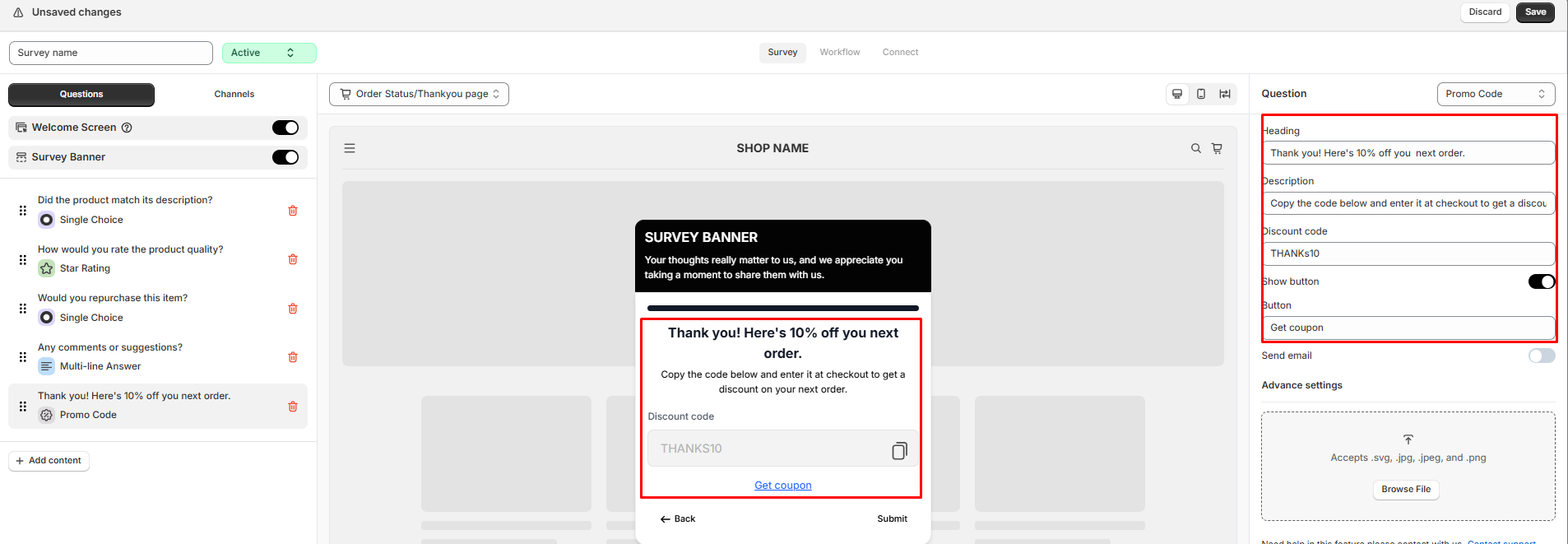
Heading and Description - the title and message customers see, for example "Thank you! Here's 10% off you next order."
Discount code - enter the code you created in Step 1. Customers see it in a box with a copy icon
Show button - turn on to show a button below the code. Enter its text in Button, for example Get coupon
Step 4 - Save and check
Click Save. Use the preview to check how the code looks on desktop and mobile
Still need help?
Our support team is available 24/7. Contact support →