
How to cancel Subscriptions?
How to cancel Subscriptions?
Overview
If you're running into any issues with how Ego is working, please feel free to reach out to us in the chat on the bottom right of the app. We're always happy to help troubleshoot and we always appreciate feedback.
If you're still set on parting ways with us though, all you need to do is change to FREE plan in our Pricing tab; changing app plan to FREE will automatically cancel your subscription to Ego.
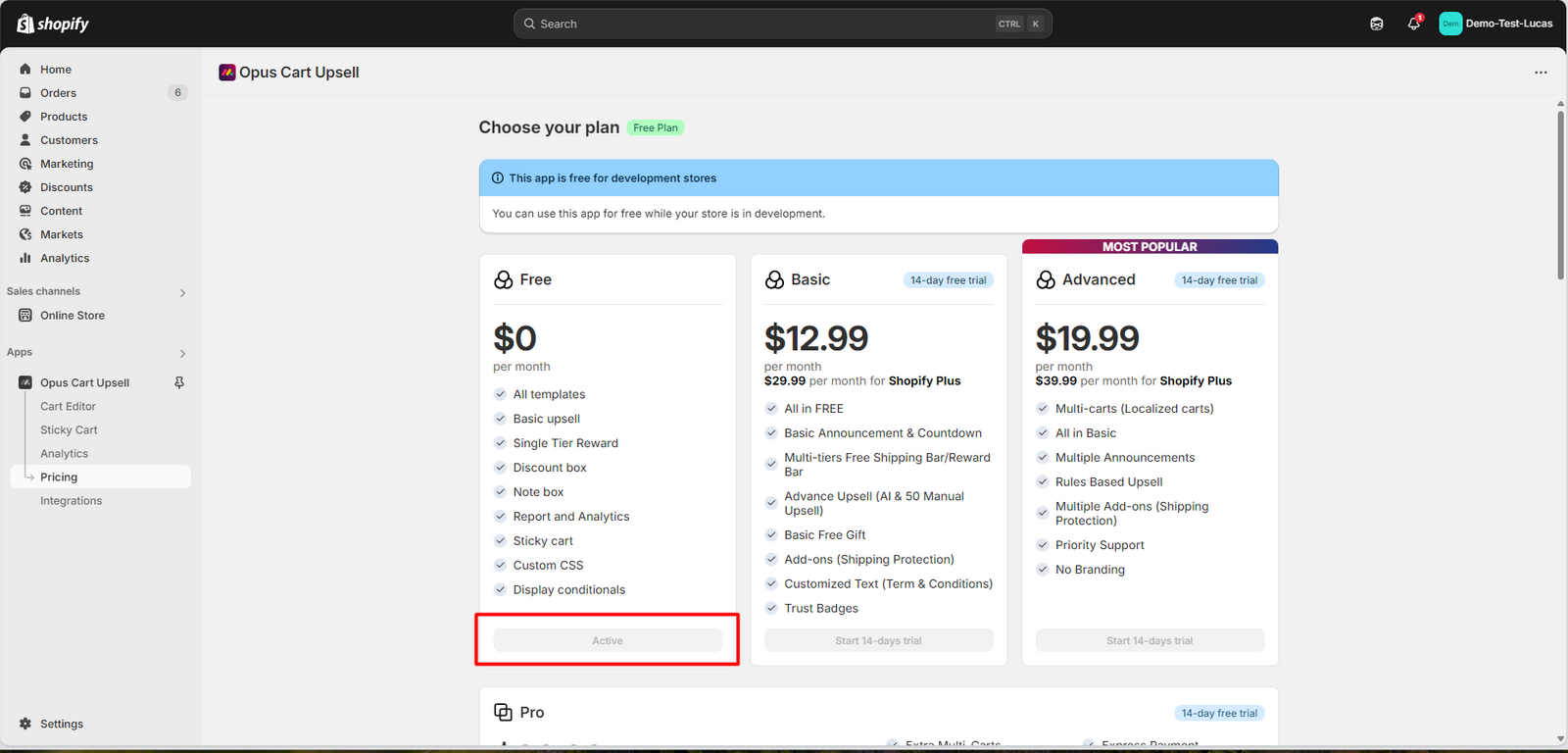
Steps by steps guide:
If you prefer to not use the above link, please follow the steps below to uninstall instead:
- Click on the "Ego Cart Upsell" app on the Apps menu of your Shopify Admin.
- Select the "Pricing" tab on the left side of the screen.
- Click select under FREE block - confirm the plan, then it's all done. You will be free of charge from now on.
| Please change the app plan to FREE before uninstalling the app to get rid of over-charged.
Rest assured that Ego doesn't leave any code behind on your store when uninstalled since it is enabled through an app embed.
Need help? Let us know via in-app live chat or email: help@egohub.co 🤩
Still need help?
Our support team is available 24/7. Contact support →